Working with Tags
In the previous tutorial, Creating your first Target, you learned the concept of a Target. In the section “What is a Target?” there is brief explanation about tags.
By default, your Factory is configured to tag all Targets built from master
and devel branches with the respective tag: master and devel.
That is good to keep the development flow fast. For example, you start with the
platform-devel, a platform build based on devel branch, and install it on the device.
Then you develop applications on containers.git from the devel branch. The
application is built in CI with a containers-devel trigger name
and produces a Target tagged with devel.
Finally, the device automatically updates to the latest Target tagged with devel.
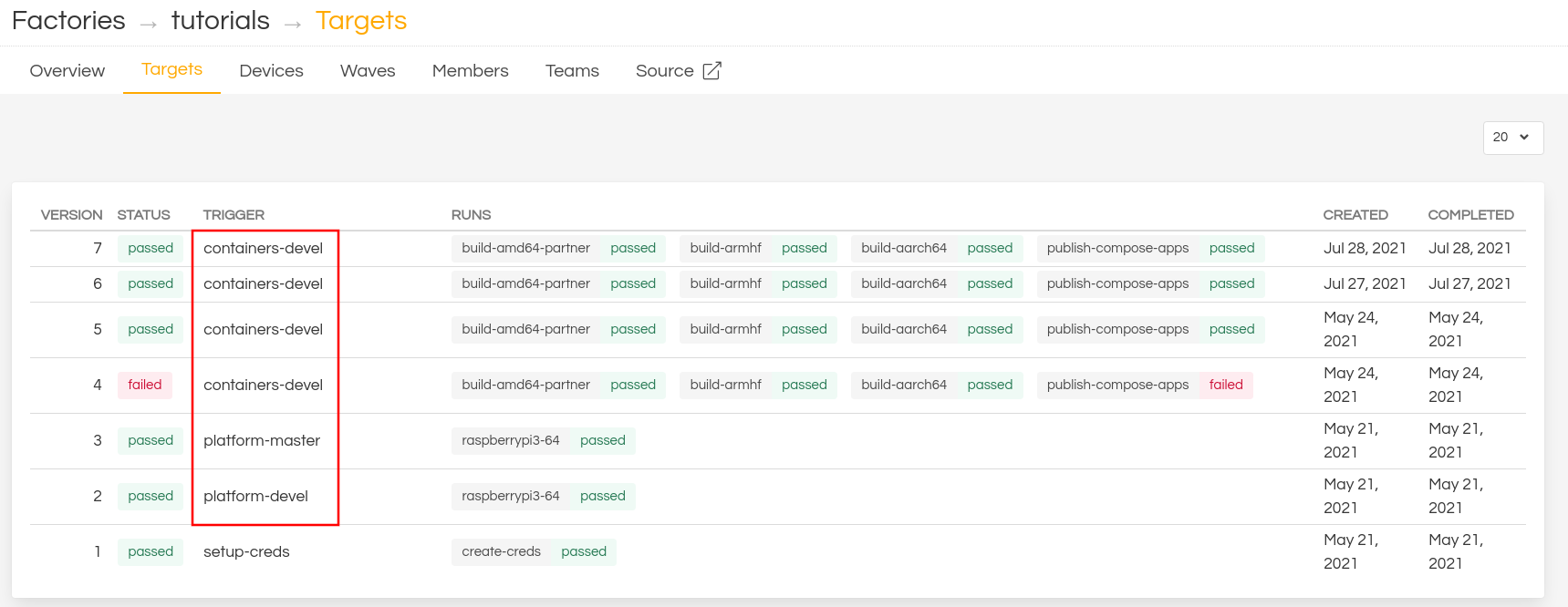
Fig. 17 FoundriesFactory CI Job List
There are some use cases that you might want to control what tag the device should follow and how Targets should be tagged.
Some examples of use cases could be:
- Prevent a device following a tag such as
develwhich is automatically created every time you change thedevelbranch. - Test a specific Target on a specific device.
This tutorial will guide you over examples to help you understand how tags work.
Note
Estimated Time to Complete this Tutorial: 20 minutes
Learning Objectives
- Create more
develTargets. - Use
fioctlto Tag a specific Target. - Configure the device to follow a specific tag.
Prerequisites
- Completed the Getting Started from Signed up to Registering Your Device.
- Completed the Creating your first Target tutorial.